What Is a Negative Prompt — And Why You're Probably Not Using One
You've spent time writing a detailed, well-structured prompt. You run it. The result has plastic-looking skin, an extra finger, a background that looks like a screensaver, and lighting so even it could only exist in a studio.
You tweak the main prompt. Run it again. Still wrong.
The missing tool is a negative prompt — and once you understand how to use one, you'll wonder how you ever generated without it.
What is a negative prompt?
A negative prompt is an instruction that tells the AI what you don't want in the image. Instead of describing your desired output, you're describing what to exclude or suppress.
Most major generators support them:
- Midjourney: uses
--no [thing]appended to the main prompt - Flux, Nano Banana, Seedream 4.5: have a dedicated negative prompt field separate from the main prompt
- Grok Imagine: responds to exclusion language built into the main prompt ("avoid studio lighting, avoid smooth skin")
Why most people don't use them
When you're learning AI image generation, the instinct is to add more to your main prompt — more detail, more description, more direction. Negative prompts feel counterintuitive, like an admission that the AI is doing something wrong and you need to police it.
The reality is the opposite. Negative prompts are a sign of an experienced user who knows what default behaviors to suppress. They're not a workaround — they're part of the craft. Every professional-quality AI image you've seen that made you think "is this real?" almost certainly had a strong negative prompt behind it.
The default behaviors worth suppressing
Through testing thousands of prompts, these are the most common unwanted defaults across photorealistic AI image generation — and the exact language to suppress each one.
Plastic skin AI generators default to smooth, poreless, heavily retouched skin. It reads as fake immediately at any resolution. plastic skin, smooth skin, retouched, airbrushed, poreless, overly smooth
Default studio lighting Without a lighting specification, many generators apply even, frontal, shadow-free lighting. It looks nothing like real photography. studio lighting, artificial light, ring light, even lighting, flat lighting
Hyper-symmetry AI images often have a subtle over-symmetry in faces and compositions that signals generation to anyone who looks closely. symmetrical, perfect symmetry, centered composition, overly symmetrical face
Hand and anatomy errors The classic tell. Even current-generation models produce distorted hands more often than they should. extra fingers, deformed hands, extra limbs, distorted anatomy, mutated hands, fused fingers
Watermarks and text artifacts Models occasionally surface text, logos, or watermark shapes from training data. watermark, text, logo, signature, words, letters, typography
Background clichés Bokeh-only backgrounds, gradient backdrops, generic cityscapes that look like desktop wallpapers. gradient background, generic background, studio backdrop, photoshop background, fake bokeh
Over-processing Hyper-sharpened, over-HDR, or over-saturated outputs that look like phone camera auto-enhance. oversaturated, HDR, over-sharpened, over-processed, unnatural colours
Non-photographic rendering When you want photography, not illustration. cartoon, illustration, painting, 3D render, CGI, anime, drawing
A starter negative prompt you can copy
For photorealistic portrait content, this covers the most common problems across all major tools:
plastic skin, smooth skin, airbrushed, retouched, symmetrical face, studio lighting,
ring light, flat lighting, extra fingers, deformed hands, extra limbs, watermark,
text, logo, gradient background, oversaturated, over-sharpened, HDR, cartoon,
illustration, 3D render, CGI
Paste this into the negative prompt field of your generator and run the same positive prompt you've been using. The output difference is usually significant.
Seeing the difference: a before/after example
Positive prompt only (no negative prompt):
Female AI model, mid-20s, sitting at a café window table in Paris, holding a coffee cup, morning light
Typical result: even lighting from everywhere, perfectly smooth skin, slightly symmetrical face, slightly generic café background.
Same positive prompt + negative prompt:
Female AI model, mid-20s, sitting at a café window table in Paris, holding a coffee cup, morning light
Negative: plastic skin, airbrushed, smooth skin, studio lighting, flat lighting, symmetrical, gradient background, extra fingers, oversaturated
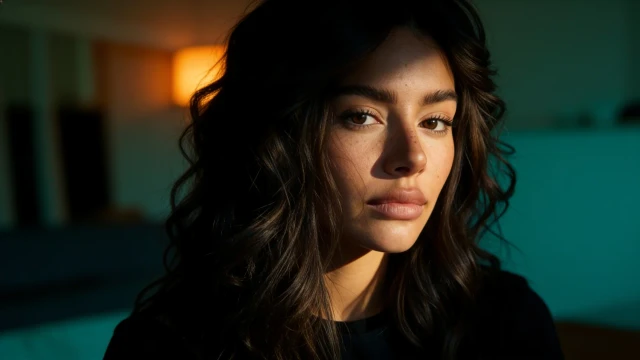
Typical result: natural skin texture, directional window light with actual shadows, an imperfect human expression, a background that feels like a real place.
The positive prompt didn't change. The negative prompt did the heavy lifting.
Tool-specific notes
Midjourney Use --no plastic skin, studio lighting, extra fingers, smooth skin appended to the end of your prompt. Midjourney's --style raw parameter also suppresses many default beautification behaviors — combine both for the strongest photorealism. Example:
[your prompt here] --no plastic skin, smooth skin, studio lighting, extra fingers --style raw --ar 4:5
Seedream 4.5 Has a dedicated negative prompt field that it takes seriously. Responds particularly well to skin texture suppressions — smooth skin, airbrushed, retouched makes a noticeable difference to the default output. Use the full starter prompt above.
Nano Banana & Nano Banana Pro Dedicated negative prompt field. Nano Banana is already stronger on skin realism than most tools, but background suppressions (gradient background, studio backdrop) and lighting suppressions (ring light, flat lighting) still meaningfully improve results.
Flux Highly responsive to negative prompts — more so than most other tools. More specific and detailed negatives produce noticeably better results than generic ones. Worth expanding the starter prompt with prompt-specific suppressions based on what you're seeing.
Grok Imagine Doesn't have a separate field. Build exclusion language directly into your main prompt: "avoid studio lighting, no smooth skin, avoid artificial backgrounds."
Building your own negative prompt library
The starter prompt above covers the universal issues. Over time, you'll notice patterns specific to your use cases — certain tools that over-saturate specific colour tones, or that produce particular hand errors with certain poses. Build a running document of your own additions.
Some useful additions for specific scenarios:
For travel/outdoor content: fake landscape, composite background, obviously edited, unnatural sky
For fashion content: mannequin, catalogue pose, stiff, commercial, department store
For fitness content: veins bulging, exaggerated muscles, bodybuilder, unrealistic physique
For any content with hands visible: extra fingers, missing fingers, fused fingers, melted hand, distorted wrist
The bigger picture
A well-written negative prompt combined with a strong positive prompt is how experienced AI creators produce results that consistently pass as real photography. The positive prompt directs. The negative prompt constrains. Together they narrow the output space from millions of possible images down to the specific range you're actually aiming for.
PoseLab prompts are written with these suppressions already considered — so if you're using our library, you're getting the benefit built in. But understanding the mechanics makes you a better creator regardless of what tools you use.
Browse the PoseLab prompt library →
Access 200+ curated prompts. New drops every week.
Start for $9.99/mo